Visibr
Log inStart a plan

The finish date is worked out, not typed.

Visibr is a planning tool for teams. You enter the work, in days, and the people who will do it. Visibr works out the finish date from the two, and shows what a change does to that date before anyone agrees to it.

Start a plan How the date is calculated

Scope ÷ people = time

Visibr ties three numbers together: the days of work left, the days of people a week, and the weeks that follow from them. Two can be chosen. The third is a consequence, and so is the finish date.

Scope left
15days
People
5days / week
Time
3weeks
Forecast finish
Fri 22 Jan 2027
Target
Fri 22 Jan 2027
Status
On track
On target

15 days of work ÷ 5 days a week = 3 weeks. Finishes Fri 22 Jan 2027, on the target.

The example: Design takes 5 days and Build takes 10, and one person works on them 5 days a week from Mon 4 Jan 2027. 15 days of work ÷ 5 days a week = 3 weeks. Finishes Fri 22 Jan 2027, on the target. With 5 more days of scope the same sum gives 4 weeks and a finish on Fri 29 Jan 2027: 5 working days late.

A change is shown before it is made

On a committed plan, Visibr does not save an edit at once: it draws the change in red on the timeline, with the new finish date beside the current one.

The strip under the sheet says the same in words, with the difference in working days, and asks why the plan is changing. “Issue change” saves it. “Discard” leaves no trace, so the same gesture answers “what if?”.

Before a plan is committed it is a draft: anything can be edited in place, with no reason asked.
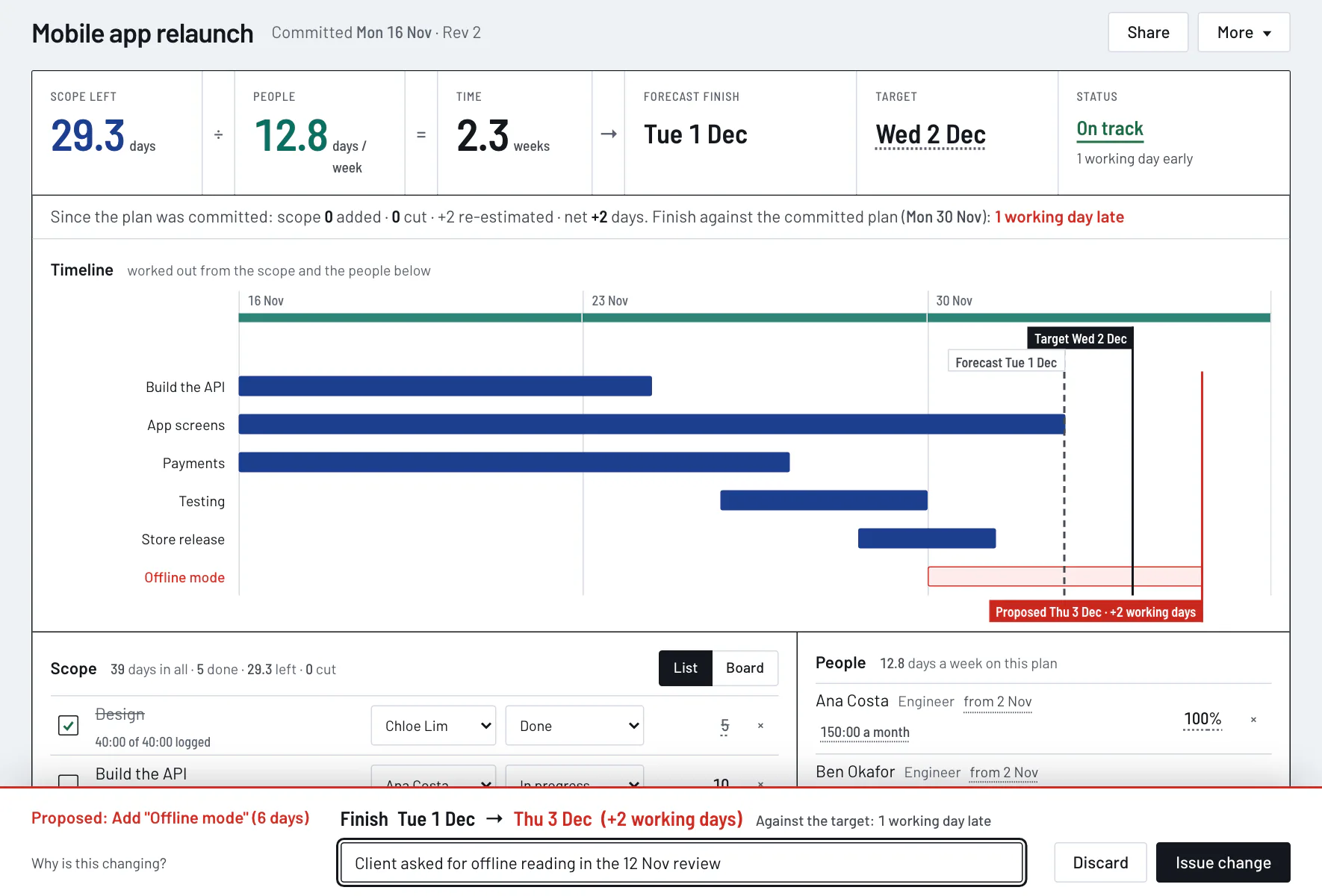
A committed plan, Mobile app relaunch, with “Offline mode” (6 days) proposed: its bar is outlined in red on the timeline, a red line marks the proposed finish Thu 3 Dec, +2 working days, and a strip at the bottom asks for the reason.
Adding 6 days of scope to a committed plan. Nothing is saved until “Issue change” is pressed.

Every change leaves a row

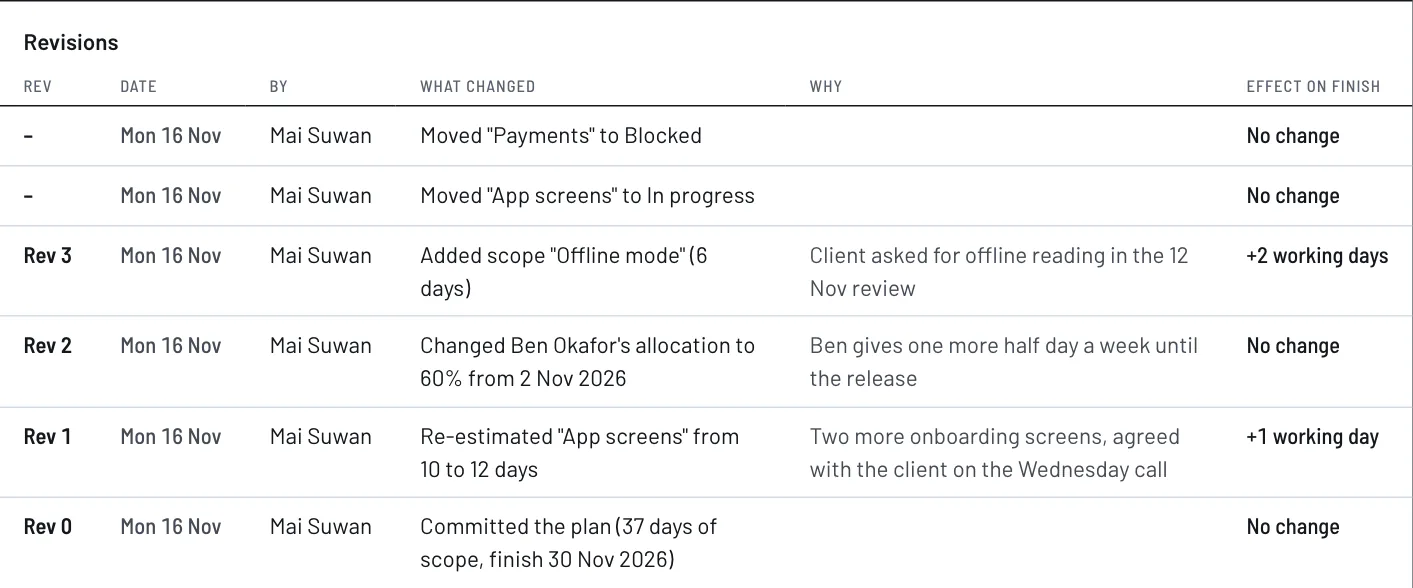
Visibr keeps a revision table on the plan itself: who changed what, when, why, and what it did to the finish date.

Committing the plan is Rev 0. Each later change to the scope, the people or the target takes the next number and needs a reason. No row is ever edited or deleted.

A small numbered triangle marks the piece of work or the person a revision touched, as on a drawing.

The revision table of a plan, newest first. Two moves of a card, which take no number. Rev 3 added “Offline mode” (6 days), +2 working days. Rev 2 changed an allocation, no change. Rev 1 re-estimated “App screens” from 10 to 12 days, +1 working day. Rev 0 committed the plan. Each revision has its reason.
The newest rows of one plan. Moving a card is progress and takes no number; a change to the plan takes the next one.

Three honest ways back when a plan is late

When the forecast passes the target, Visibr works out three ways back from the same equation and writes them under the figures.

A late plan: 35.3 days of scope ÷ 13 days a week = 2.7 weeks, forecast Thu 3 Dec against a target of Wed 2 Dec. Under the figures: To hit the target: cut 1.5 days of scope, add 1 day a week of people, move the target to Thu 3 Dec.
The same plan after the change was issued: one working day late, and what would bring it back.
Cut scope
The days of work that do not fit before the target.
Add people
Those days, spread over the weeks left until the target, in days a week.
Move the target
To the forecast finish. One click drafts that change, in red, like any other.

One person is one person

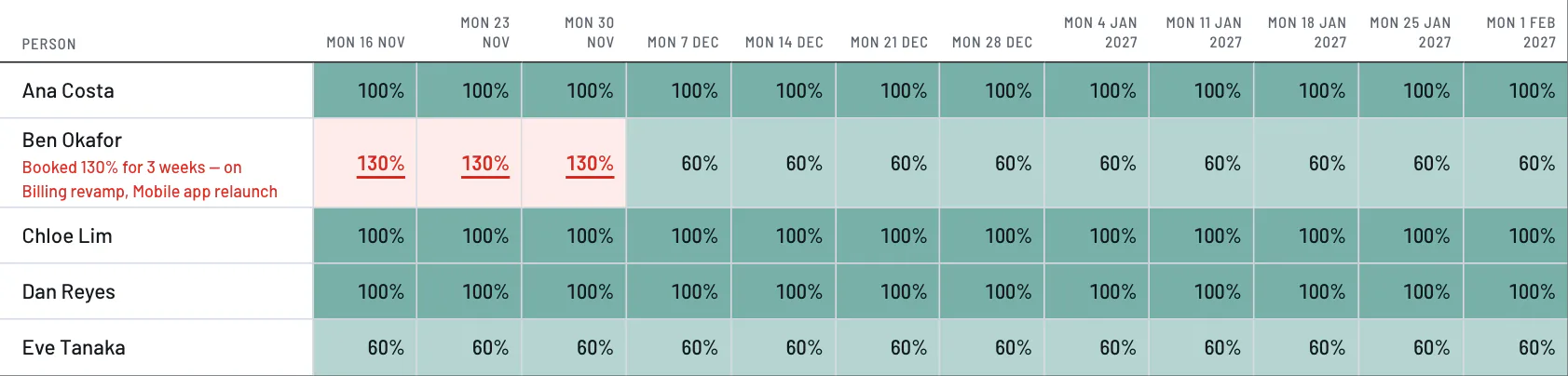
Visibr adds up each person's allocations across every plan, week by week, so someone booked on two plans is counted once.

Going over 100% is allowed, because it happens. It is shown in red rather than hidden or refused: in the People grid, and on the plan at the moment the person is allocated, with the names of the other plans.

The People grid: one row for each person and one column for each of twelve weeks. Ben Okafor is booked 130% for three weeks on Billing revamp and Mobile app relaunch, marked in red; the others are at or under 100%.
Twelve weeks of load for five people on three plans.

One link for the people who ask

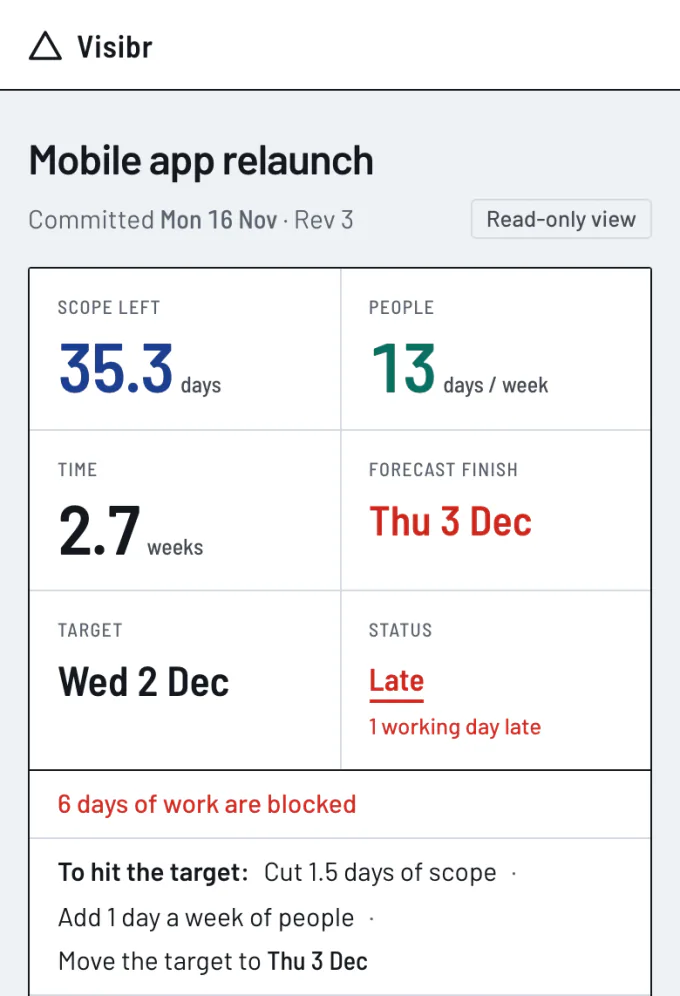
Visibr gives each plan a share link that opens the same sheet, read-only, with no account needed.

It shows the live calculation and the revision table, not a report written about them, and it reads on a phone.

People appear by name and role, never by email. Nothing of any other plan is shown. The link can be replaced or revoked at any time.

The read-only view of a plan on a phone: the six figures stacked two by two, the status Late in red, a note that 6 days of work are blocked, and the three ways back to the target.
The shared sheet at 390 px wide.

An AI assistant reads the same plan

Visibr speaks the Model Context Protocol (MCP), so an AI assistant can read a plan, try a what-if and make a change under the same rules as a person.

Create a token under “Connect AI” and paste one line into the assistant. A read-only token can look and run what-ifs, and cannot change anything.

What an assistant changes lands in the revision table marked “via AI assistant”. It can also move a card on the board and log the day’s hours.

The line the Connect screen gives you

claude mcp add --transport http visibr https://dev.visibr.com/mcp --header "Authorization: Bearer <your token>"

Every tool an assistant can call

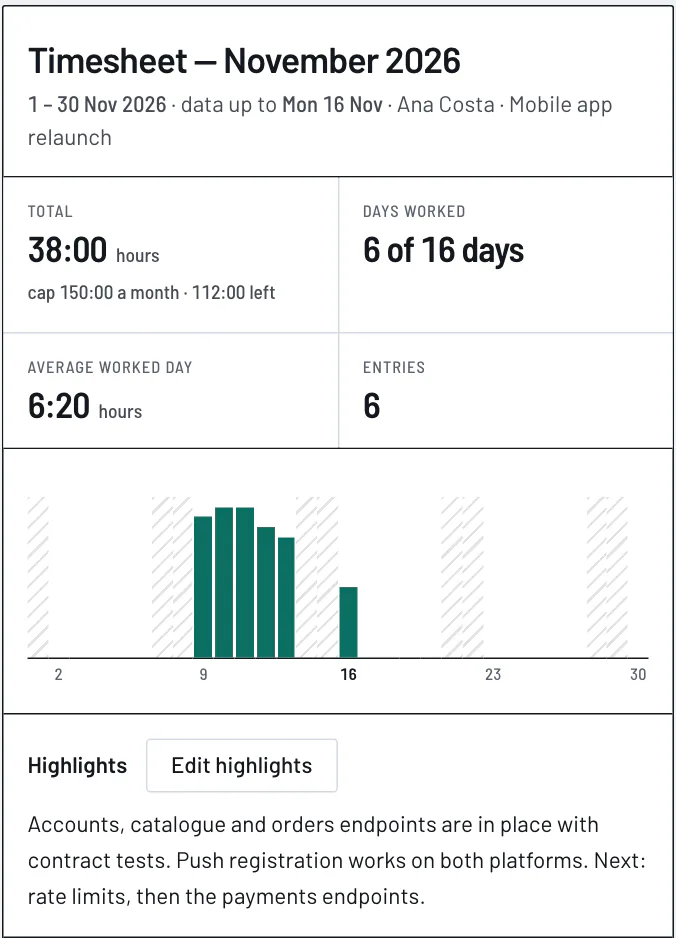
A monthly timesheet report for one person: 38:00 hours against a cap of 150:00 a month, 6 of 16 days worked, an average day of 6:20, a bar for each day and the highlights of the month.
The month’s timesheet for one person.
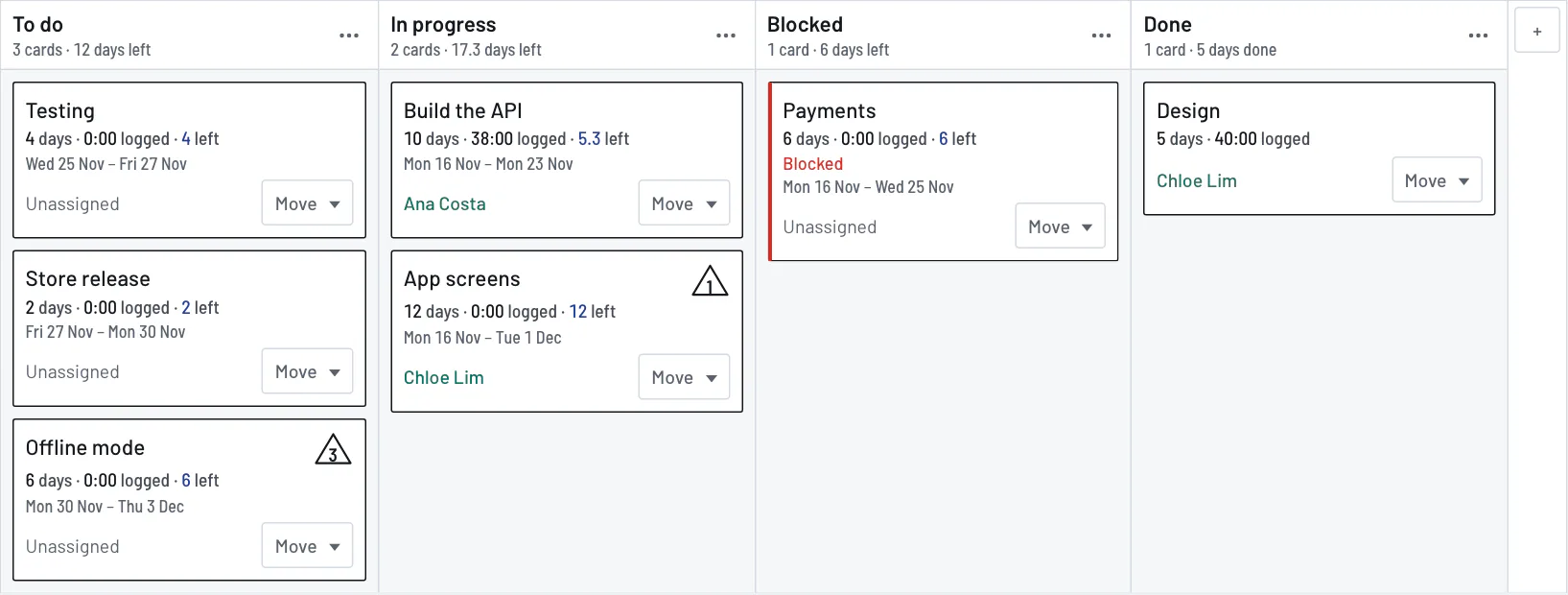
The board of a plan with four columns: To do, In progress, Blocked and Done. Each card shows its estimate, the hours logged, the days left, its dates and who it is assigned to.
The same work as a board. A card carries its estimate, what is logged and what is left.

Questions and answers

How does Visibr calculate the finish date?

Visibr divides the days of work left by the days of people a week, then walks the calendar from the start day, Monday to Friday, spending each day's capacity on the work in order. The day the last piece of work ends is the finish date. Nobody types it.

What happens when scope is added to a plan?

On a draft, Visibr recomputes the finish date at once. On a committed plan it first draws the addition in red, with the new finish date and the difference in working days, and asks for a reason. Issuing the change adds a numbered row to the revision table; discarding it changes nothing.

Does Visibr replace a task tracker?

Not a full one. Visibr keeps a plan's work as a list and as a board with columns and one assignee for each piece of work, which is enough to track status. It has no comments, attachments or sub-tasks. Its job is the finish date that follows from the work and the people.

How does Visibr handle people who work on several plans?

Visibr adds up each person's allocations across all plans for every week and shows the total as a percentage of their capacity. Going over 100% is allowed and marked in red, in the People grid and on the plan where the person is being allocated, with the names of the other plans.

How do timesheets and monthly caps work in Visibr?

A plan in Visibr can keep a timesheet, counted in hours or in days. Time logged on a piece of work reduces what is left of it, which moves the forecast. A person can have a monthly cap on a plan; going over it is shown, never refused. Each month has a printable report with two signature lines.

What can an AI assistant do in Visibr, and can it change things?

Over MCP, an assistant can read Visibr's plans, people, board and timesheets and preview a change. With a full token of an owner or editor it can also create plans, commit changes, move and assign work and log time. A read-only token cannot change anything. Whatever it changes is logged as made via AI assistant.

Who can see a shared link?

Anyone who has the link, without an account. A Visibr share link shows one plan, read-only: its figures, timeline, work, people's names and roles, and revision table. It never shows an email address, another plan, or the time entries. An owner or editor can replace or revoke it.

Where does Visibr keep its data?

Visibr keeps a workspace's plans, people, time entries and change log in the database of the server it runs on. A workspace is served only its own records. Passwords are stored as scrypt hashes and access tokens as SHA-256 hashes, so neither can be read back.

Start a plan

A first plan in Visibr is three fields and two text boxes: a name, a target date and a start date, then the work, one line for each piece with its days, and the people, one line for each with their percentage.

The finish date appears beside the form while you type.

Start a plan